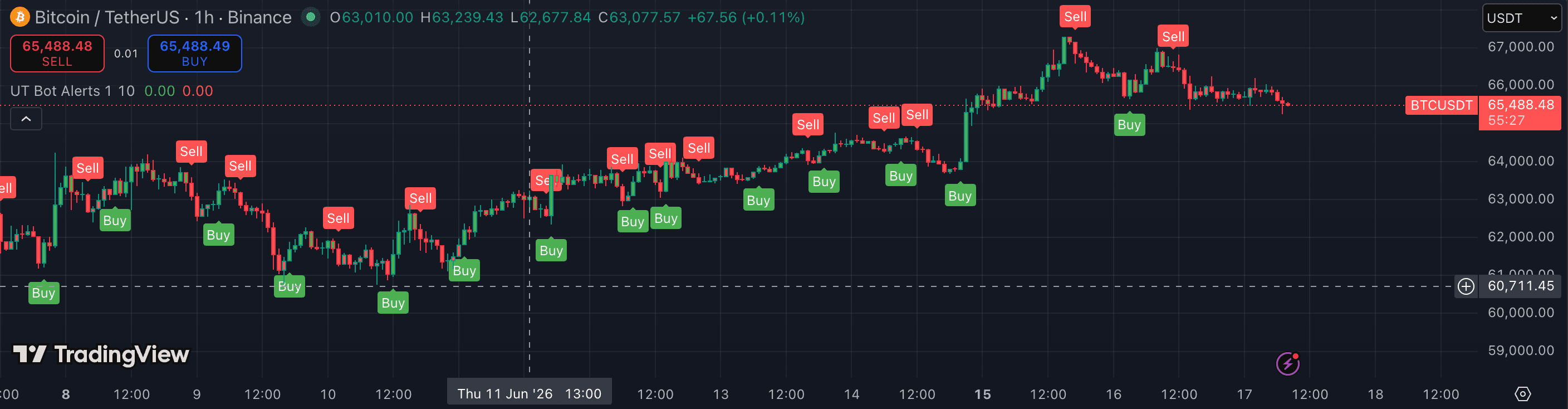
UT Bot Alerts is a transparent signal tool: it's an ATR-based trailing stop that flips long/short and fires alerts when it does. Its reputation for 'too many false signals' is almost always a tuning problem. Here's how it works and how to set it.
1. Know what it actually does
UT Bot tracks price with an ATR-multiplied trailing stop. When price closes through the stop, the trend flips and a buy or sell label prints. That's the whole logic — no hidden magic.
Because it's a trailing stop, it doubles as your exit, not just your entry.
2. Tune the key value to your noise
The 'Key Value' (sensitivity) is the ATR multiplier. Lower = tighter stop, more signals, more whip. Higher = wider stop, fewer but cleaner flips.
On noisy low timeframes, raise the key value. The default 'a=1, ATR=10' is a starting point, not gospel.
3. Add a trend filter
UT Bot has no trend awareness. Many traders enable the built-in 'use Heikin Ashi' option or add an EMA filter so they only take flips in the direction of the higher-timeframe trend.
4. Wire the alerts properly
Set TradingView alerts on the buy/sell conditions so you get pinged on flips without watching the screen — the tool's main selling point. Always alert on bar close to avoid repaint-style fakeouts.
- Running the tightest key value on a 1m chart and blaming the tool for whipsaw.
- Taking flips with no trend filter, so you fade strong moves.
- Alerting intrabar instead of on close, which fires on fakeouts.
- Treating a flip as a confirmed trade signal rather than a trigger that still requires a complete plan behind it.