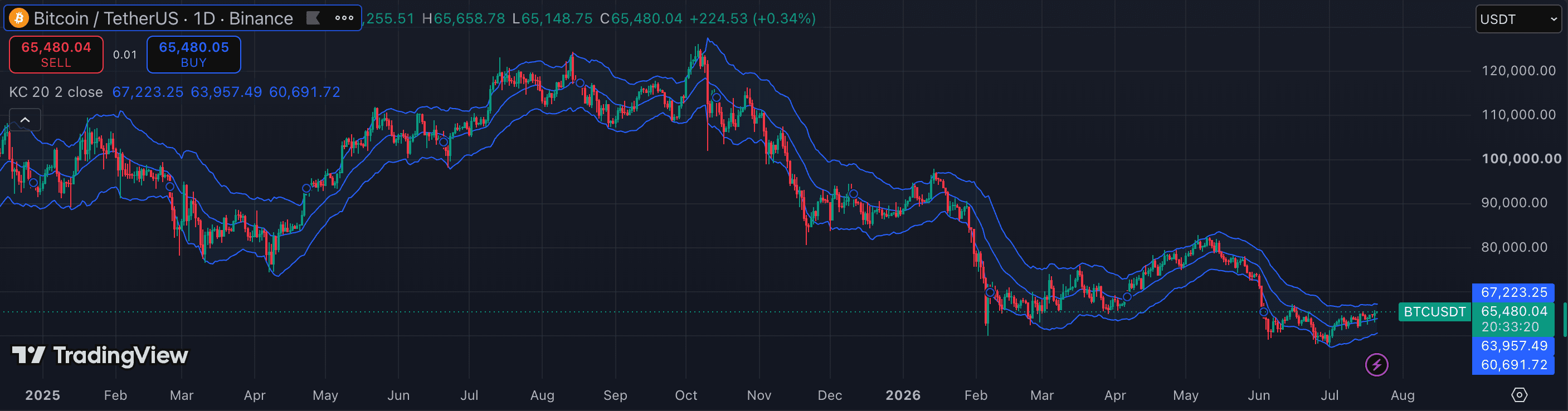
Keltner Channels plot an EMA centerline with upper and lower bands set at a multiple of ATR above and below it. Unlike Bollinger Bands, which expand and contract with standard deviation, Keltner Channels use the Average True Range — making them smoother and less prone to sudden band explosions during news events. In crypto, the combination of a faster-moving underlying (EMA) and ATR-based bandwidth makes Keltner Channels a useful tool for identifying trend direction, measuring overextension, and detecting squeeze setups. The default settings, however, were designed for quieter markets. This guide covers what to adjust and why. This content is for educational purposes only and does not constitute investment advice.
1. Understand the three core inputs
Keltner Channels on TradingView have three settings: EMA length (the centerline period), ATR length (how many bars the ATR calculation uses), and multiplier (how many ATR units wide the bands are). The EMA length controls the channel's lag and trend sensitivity. The ATR length controls how fast the band width responds to volatility changes. The multiplier controls how wide the bands are relative to recent volatility.
In practice, the multiplier is the most important setting to tune for crypto. A multiplier of 2 (the common default) produces bands that price rarely escapes in trending conditions — but on crypto, strong momentum moves regularly push price far outside a 2× ATR band. The right multiplier depends on whether you want the bands to capture normal price action (wider) or to signal overextension (narrower).
2. EMA length: 20 is the standard, 10 for faster charts
The EMA centerline is the trend reference. A length of 20 is the most common setting and gives a reasonable balance between responsiveness and stability on 1h–4h charts. On 15m or faster crypto charts, an EMA length of 10–13 reduces lag and keeps the centerline closer to the current price action.
A longer EMA (50 or more) turns Keltner Channels into a broader structural tool — the centerline becomes a medium-term trend anchor and the bands mark very significant overextensions. This is useful for daily chart swing analysis but produces bands that are too slow for intraday crypto trading.
3. Multiplier: adjust for crypto's wider ranges
The default multiplier of 2 works on equities where daily ranges are relatively contained. On crypto, a 2× multiplier often produces bands that price breaks through regularly during momentum sessions, making the breakout signal less meaningful. For crypto, consider increasing the multiplier to 2.5–3 on lower timeframes (15m–1h) so that band touches and breaks represent genuine overextension rather than normal intraday movement.
Conversely, if you are using Keltner Channels specifically to identify squeeze setups (where Bollinger Bands compress inside the Keltner Channels), keep the Keltner multiplier at 1.5 or 2 — the squeeze is most meaningful when the Keltner Channels are narrow enough that the Bollinger Band compression is clearly visible.
4. Use the EMA centerline as the primary trend filter
The most reliable use of Keltner Channels in crypto is directional: price above the EMA centerline indicates bullish momentum; price below indicates bearish. When price is trending strongly, it will 'walk' along the upper or lower band — touching and retreating from the upper band in an uptrend without ever reaching the lower band. This walking pattern confirms trend strength.
When price oscillates around the centerline and alternates between touching the upper and lower bands without sustained movement, the market is in a range. Keltner Channels are most effective when the centerline is sloping clearly in one direction — flat channels in a sideways market produce false breakout signals.
5. Keltner Channels + Bollinger Bands: the squeeze setup
One of the most popular applications of Keltner Channels in crypto is identifying a 'squeeze' — a period where Bollinger Bands (default 20/2) compress inside the Keltner Channels (default 20/2 ATR). During the squeeze, volatility is contracting and the market is coiling. When the Bollinger Bands expand back outside the Keltner Channels, it signals a volatility expansion and a potential directional breakout.
The squeeze itself does not indicate direction — it only signals that a move is likely incoming. Combine the squeeze signal with price position relative to the Keltner Channel centerline and a momentum indicator (MACD histogram or volume) to determine the likely breakout direction before committing to a trade.
- Using a 2× multiplier on crypto short timeframes without adjusting — band breaks will occur frequently and lose their signal value as overextension indicators.
- Treating band touches as automatic buy or sell signals — in a trending market, price walks along the outer band for extended periods without reversing.
- Using Keltner Channels with a flat (non-sloping) centerline and expecting breakout signals — a flat channel means the market is ranging; breakout signals from flat Keltner Channels are mostly noise.
- Mixing up Keltner Channels and Bollinger Bands as equivalent tools — they use different volatility measures (ATR vs standard deviation) and behave differently, particularly during volatility spikes.
- Ignoring the centerline trend direction when taking band-touch trades — trades against the trend (e.g. shorting a touch of the upper band while the centerline is rising) have lower success rates than trades in the direction of the centerline slope.